
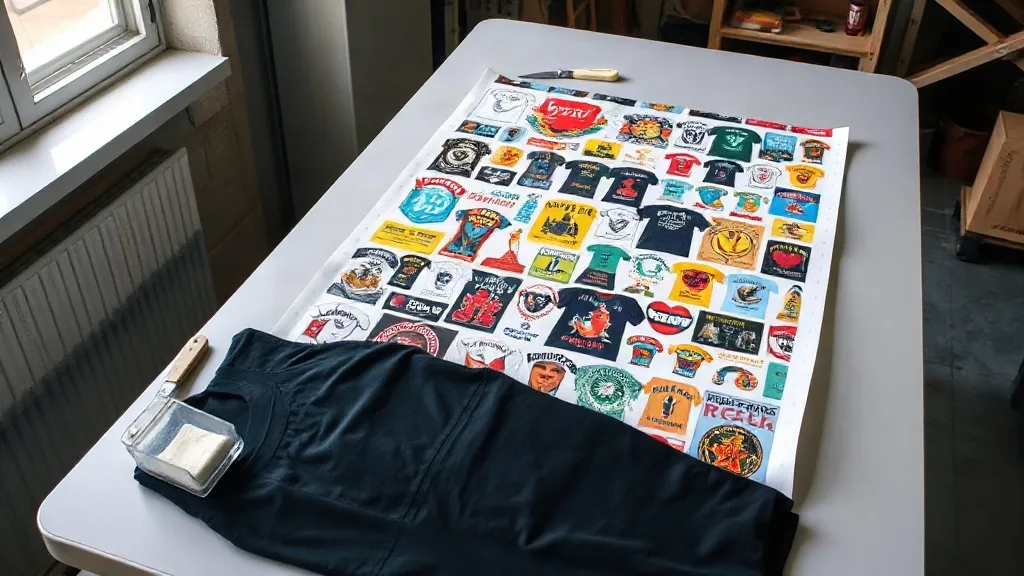
Anyone who has priced out a small print run knows the sting: the design is twelve inches wide, but the film comes off the roll at twenty-two, and the rest of that sheet goes in the bin. That leftover space is the reason a DTF Gangsheet exists. Instead of printing one job at a time, you pack several designs onto a single long sheet, pay for the film once, and cut each piece out afterward. Simple idea, but the difference between a gangsheet that saves you money and one that quietly eats your margin comes down to layout decisions most people never think about.
What Actually Makes a Gangsheet Worth Building
The economics are straightforward on paper. DTF film, powder, and ink are consumed per square inch, so empty space is money. If you print three six-inch chest logos on separate sheets, you are paying for three sheets of film, three passes through the powder station, and three trips through the curing oven. Nest those same three logos onto one sheet and the material cost drops by roughly the amount of unused border you eliminated.
What surprises people is how much of the saving comes from handling rather than materials. A single long sheet goes through the printer once. That means one load, one powder shake, one cure, and one cut session at the end. For a shop running a handful of custom orders a day, the time recovered on powder and curing is often worth more than the film itself.
The catch is that a gangsheet only pays off when the sheet is genuinely full and the designs genuinely belong together. A half-empty sheet with three logos floating in the middle is not a gangsheet, it is an expensive single print.
Planning the Layout Before You Open the RIP Software
Most wasted film traces back to layout done in a rush. Before you drop a single file onto the canvas, it helps to know three things: the exact print dimensions of each design, the width of your film roll, and how many of each design you actually need.
Start with the tallest design
Place your tallest artwork first and build the rest of the sheet around it. Tall pieces dictate the vertical rhythm of the sheet, and smaller designs fill the gaps beside them far more efficiently than the reverse. If you start with a row of small logos, you end up with awkward strips of dead space that no full-size design can use.
Group by ink coverage, not by customer
This one is counterintuitive. Printing a heavy full-color photo next to a two-color line drawing means the printer lays down ink unevenly across the sheet, and the curing step has to compromise between the two. Grouping designs with similar ink density produces more consistent curing and fewer rejects. Customer grouping feels tidy on a job sheet, but it costs you in quality.
Leave real breathing room
Designs need a small gutter between them so the cutter has somewhere to travel and so ink does not bleed across boundaries during curing. Crowding artwork edge to edge to squeeze in one more logo usually backfires when two designs touch and both get scrapped.
The Numbers Behind a Well-Built Sheet
A useful way to judge your own layout is to calculate fill rate: the total printed area of your designs divided by the total area of the film you used. A tight, well-planned sheet typically lands somewhere in the range of seventy to eighty-five percent fill. Anything below sixty percent is a signal that you are either printing too few designs or sizing them inefficiently.
Run that calculation for a week of orders and patterns appear fast. You will notice which product types consistently leave dead space, which designs are awkward to nest, and where a small size adjustment would let two more pieces fit. That feedback loop is more valuable than any generic template, because it reflects your actual artwork mix.
- Track fill rate per sheet for two weeks before changing anything.
- Note which designs force awkward gaps and consider re-cropping them.
- Compare film cost per finished transfer before and after layout changes.
Mistakes That Quietly Raise Your Cost Per Transfer
Even experienced operators lose money to a handful of recurring habits. None of them look like mistakes at the time.
Printing a full sheet for a partial order
It is tempting to fill the remaining space with designs you might need later. Sometimes that works. But if those designs sit uncut for weeks, you have tied up film, powder, and ink in inventory that may never sell, and you have no idea whether the colors still match a future order. Fill space with designs that already have a buyer.
Ignoring the mirror
DTF transfers are printed in reverse and pressed face down. A design that was never mirrored during setup comes out backwards, and on a full gangsheet that error can ruin every piece at once. Check orientation on the canvas before the printer starts, not after.
Letting the sheet sit before curing
Uncured ink on film is fragile. Sheets left on a bench while other jobs run pick up dust, smudges, and humidity, and the powder adhesion suffers. Cure promptly, or store flat in a clean, dry place with a cover.
Cutting too tight
Trimming right to the artwork edge leaves no margin for the press operator to grip, and the transfer can shift during pressing. A few millimeters of border costs almost nothing and prevents a whole category of misprints.
When a Gangsheet Is the Wrong Choice
Gangsheets are not universally better, and pretending otherwise leads to bad decisions. If you need a single large back print, building a sheet around it just to fill space adds work without adding value. If your designs change daily and you cannot predict tomorrow's orders, a sheet built today may not match what you sell tomorrow. And if your shop does not have a reliable way to track which piece on a cut sheet belongs to which order, the sorting overhead can erase the savings.
The honest test is volume and repetition. Shops producing a steady stream of small to medium designs with predictable demand get the most from batching. One-off custom work with wildly varying sizes often runs better as individual prints.
Building the Habit, Not Just the Sheet
The shops that get real value from batching treat layout as a repeatable process rather than a creative act. They keep a running queue of approved designs waiting for space, they review fill rate weekly, and they adjust artwork dimensions when a design consistently creates dead space. Over a few months, that discipline turns into a measurable drop in cost per finished transfer without any change to the press, the powder, or the ink.
Start small. Take one week of orders, build a single sheet with deliberate nesting, and measure what you actually spent versus what you would have spent printing individually. The gap you find is the number worth optimizing.
Frequently Asked Questions
How many designs should go on one DTF gangsheet?
There is no fixed number, because it depends on design size and film width. A sheet with twenty small logos might use less film than one with three large back prints. Aim for a fill rate above seventy percent rather than a specific count.
Can I mix different fabric types on the same sheet?
Yes. The transfer itself does not change based on the garment it will eventually be pressed onto. What matters is that designs on the same sheet share similar ink coverage so curing stays consistent across the whole run.
How long can an uncured gangsheet sit before printing quality drops?
It varies with humidity and dust in your workspace, but the safe approach is to cure as soon as the printer finishes. Sheets left out for extended periods tend to show powder adhesion problems and smudging that only appear after pressing.
Is a gangsheet cheaper than ordering individual transfers?
Usually, when the sheet is well filled and the designs are needed at the same time. If the sheet is half empty or the extra pieces sit unused for months, the savings disappear. The calculation is film area used versus film area paid for.
Do I need special software to lay out a gangsheet?
Most RIP and design programs that ship with DTF printers include nesting or step-and-repeat tools. A vector editor with precise alignment guides works too, as long as you can set exact dimensions and mirror the artwork before export.